Every job. One platform.

Early adopter pricing

Construction software built in a roofing shop, not a software office

FloBuildr runs the job the way a contractor actually runs it. The estimate you sell becomes the worksheet you work. Cost, invoices, and the customer portal live on that same job. One company price, unlimited users, every feature included.

Free for 30 days. No credit card. Every feature on.

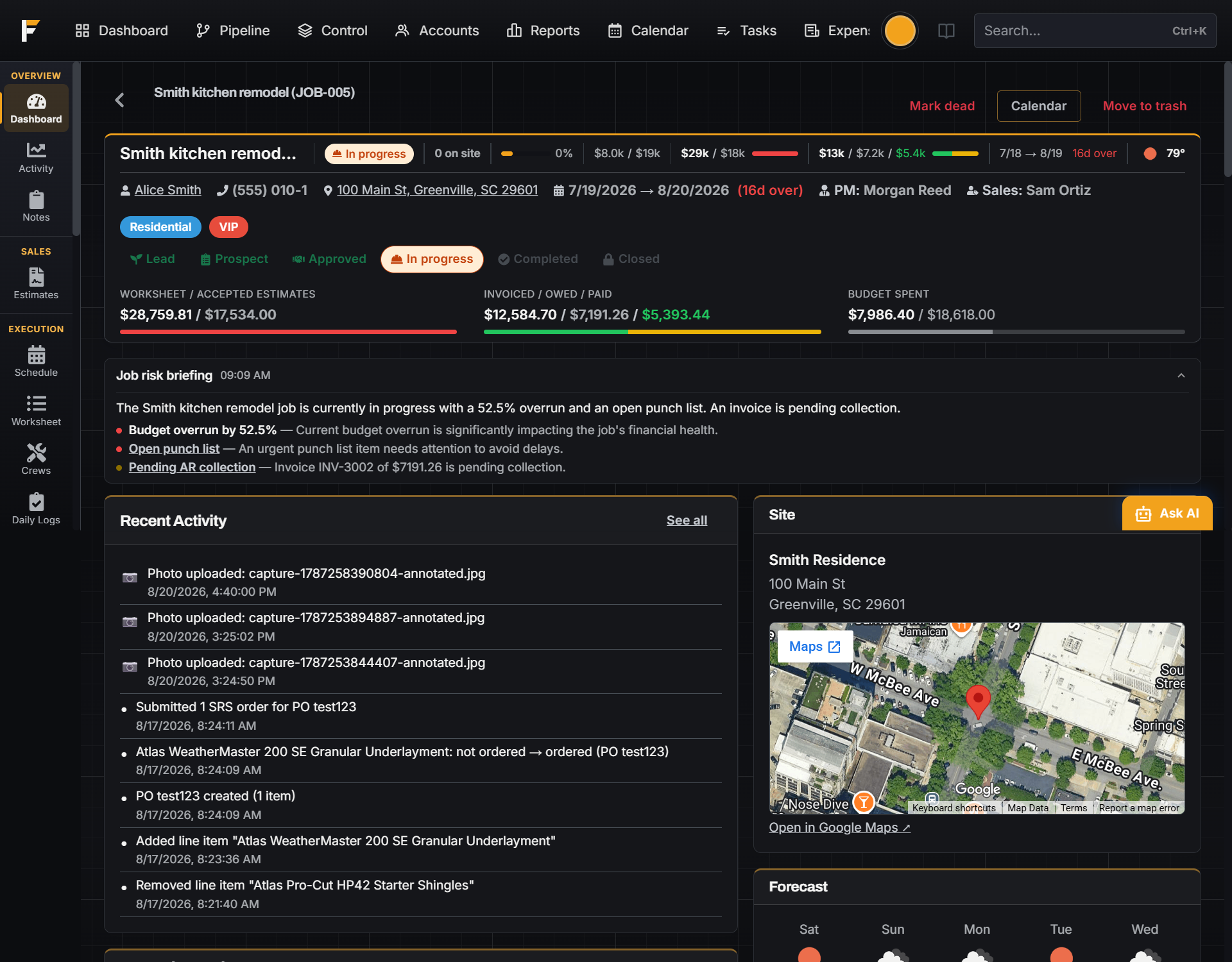
FloBuildr job dashboard with budget, invoicing, and the morning risk briefing on one job

Where FloBuildr was built and proved

MCA Construction and Roofing

Sales in one tool. Production in another. Margin in a spreadsheet.

Most shops buy a CRM for bids, something else to run the work, and keep photos and texts on personal phones. The books catch up after the job is done. Every new hire is another seat. The features you actually need sit behind another plan.

  • The winning bid gets rebuilt. Production opens a spreadsheet and types the same scope a second time.
  • You find out you lost money too late. Receipts get reconciled after the final draw is already spent.
  • You leave people off the system because each login costs money.

FloBuildr keeps the whole job on one Job Profile. What you sell is what you run. What you run is what you bill.

A contractor on an active job site reviewing work

Stop making the office re-enter what the crew already knows.

Sales, the office, and the field work off the same job. When the crew updates progress, photos, or time, it is already on the record the office is looking at.

Built around a job, not a stack of modules.

The Job Profile is the whole project: estimates, worksheet, schedule, budget, invoices, and the customer portal. There is no separate sales database and production database. See it for roofing, remodeling, and specialty trades.

The bid becomes the work plan

Accept an estimate and pull it into the worksheet. Change orders and add-ons stay on the same job.

Status does the next step

Mark a material Ordered and FloBuildr opens the purchase order. Mark it Delivered and the receipt logs against the job.

Cost you can see in time

Budget, committed, spent, billed, and collected sit on the job while the crew is still on site.

Unlimited users

One flat price for the company. Put office, sales, and crew on it without counting seats.

Four steps. Same job the whole way.

You do not implement modules. You run a job the way you already run a job. FloBuildr keeps the handoffs on the same page.

1

Take the lead

Pipeline by stage and value. Follow-ups by company email or text, so personal phones stop being the office inbox.

2

Price and sell

Line-item library, live supplier pricing, branded PDF, e-sign. When the customer accepts, the job moves to Approved.

3

Run the work

Pull the accepted bid onto the worksheet. Schedule the crew. Order materials. Log photos, punch, and daily progress from the site.

4

Bill and collect

Deposits, draws, and finals against live cost. Customers see progress and pay in the portal.

The worksheet, the morning board, and the roof count.

The worksheet is the work plan

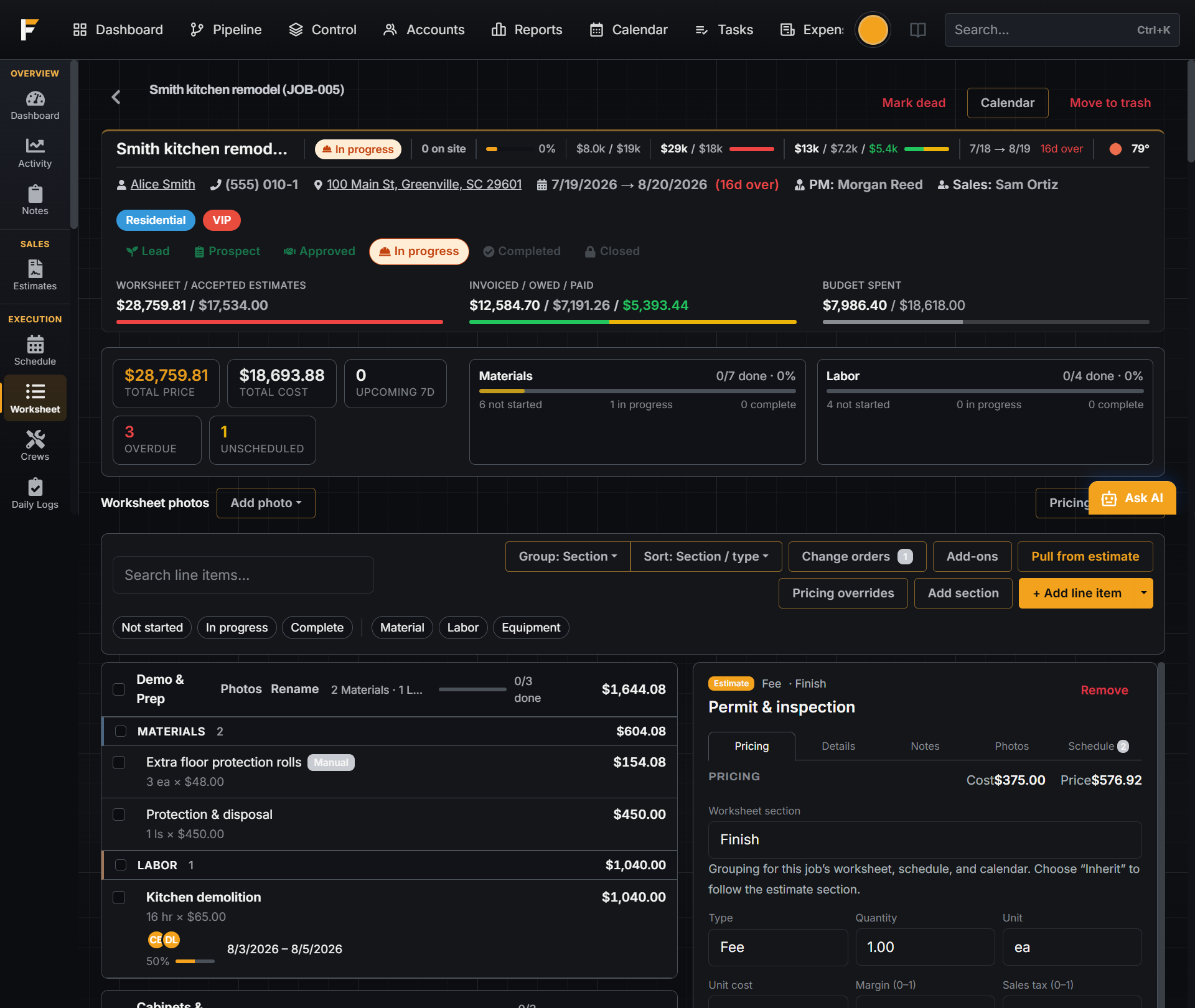
Mark a material Ordered and FloBuildr opens a purchase order, grouped by vendor. Mark it Delivered and the receipt hits the job. Materials, labor, and equipment each have their own lifecycle, and Budget vs Actual updates as you go. Production is not a second spreadsheet.

Watch every active job at once

Control is a live board for the jobs you group with tags — a neighborhood, a crew’s book, a region. Who is on site, what is at risk, and how the money looks across the group. The dashboard briefing ranks what needs attention and links straight to the job.

Measure the roof from the satellite view

Trace the planes, set the pitch, and get roof area, squares, and squares with waste, plus eave, ridge, hip, valley, and rake. It saves to the property, so the next job at that address starts with it. Lot, driveway, and yard measurements work the same way.

A fast estimate, not a certified report. Verify on site before ordering for a tight job. Certified auto-pitch reports are available from a connected provider when you need one.

Also in the product: a visual workflow builder, live supplier pricing and ordering inside the estimate, two-way QuickBooks Online sync, and a customer portal with a private link instead of another login.

Sell the job without losing the handoff

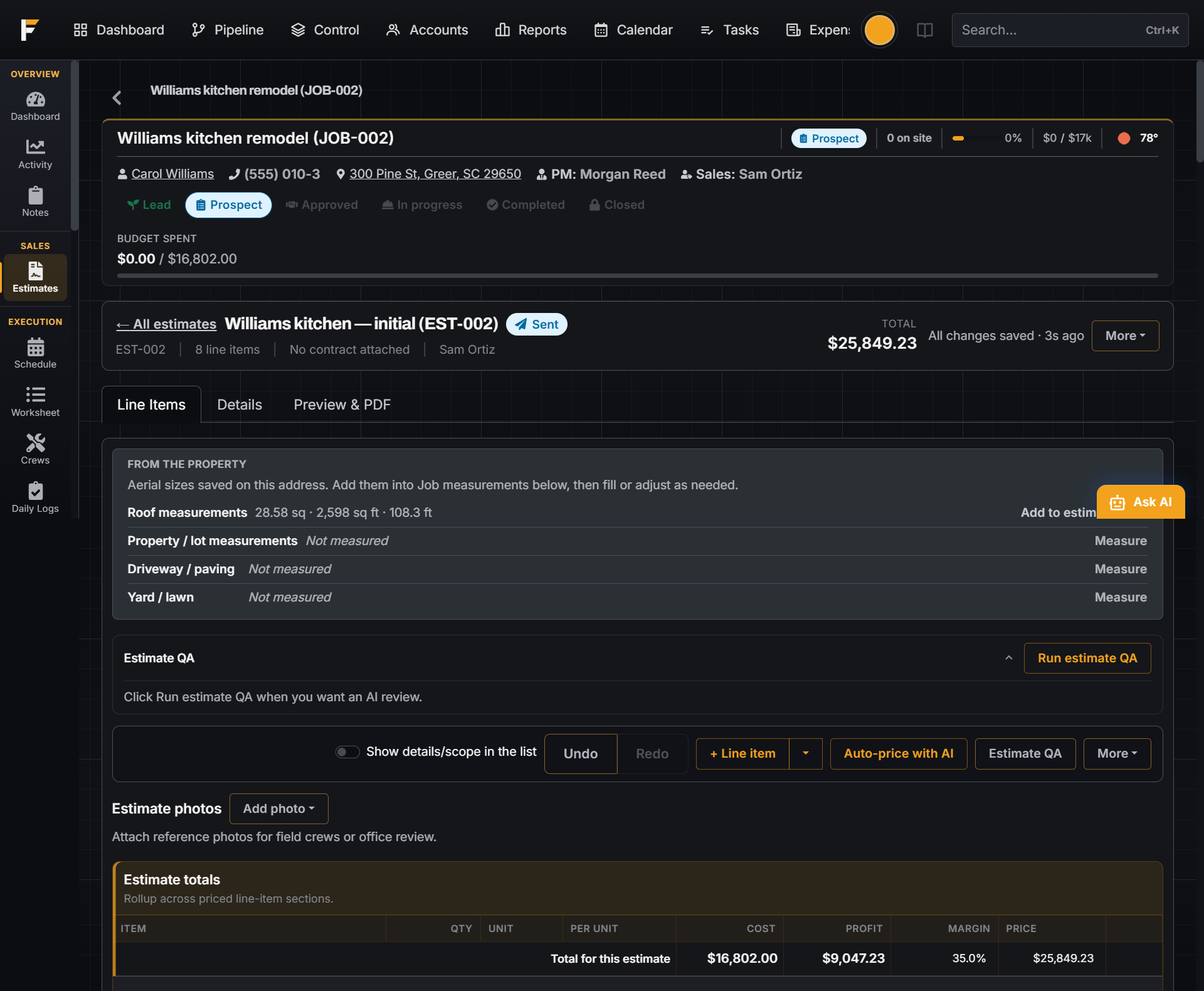
Build a priced estimate from your library, pull live distributor pricing onto the bid, send a branded PDF, and collect the e-signature. When it is accepted, the job moves to Approved. Pull those lines onto the worksheet so production is not rebuilding the bid.

  • Pipeline by stage & value
  • Live supplier pricing
  • E-sign & contracts
  • Change orders & add-ons
FloBuildr estimate with line items, roof measurements, margin, and totals

Run the job from the same place you sold it

The worksheet is the operational plan: materials, labor, status, crew, and dates. Job schedules roll up to a company calendar. Control lets you watch a whole group of active jobs at once. Photos, daily logs, punch lists, and permits stay on the job instead of vanishing into group chats.

  • Worksheet & POs
  • Company calendar
  • Control board
  • Field photos & logs
FloBuildr worksheet with material and labor lines, status, and live cost

Know the margin before the job is done

Budget vs Actual tracks contract value, accepted estimates, committed spend, actuals, invoices, and payments on one screen. Catch overruns by line type while you can still do something about them. Bill deposits, draws, and finals, and let customers pay in the portal.

  • Budget vs Actual
  • Invoices & payments
  • Customer portal
  • Online payments
FloBuildr Budget vs Actual with live cost by line type

From the shop we built it in

“We were paying about $2,500 a month for a roofing CRM and still fighting the handoffs. Things got retyped, details fell through. We wanted a system that didn’t just have everything, but actually felt like one continuous job from first bid to final payment. That’s the difference now. It finally feels like one process.”

Bradley McHugh, FloBuildr co-founder and owner of
MCA Construction & Roofing

20+ jobs run end to end · about 30 people in the system, zero per-seat cost · about $1M of work in progress

From MCA Construction & Roofing, co-founder Bradley McHugh’s own company, running FloBuildr.

Early adopter pricing

One price for the company. Unlimited users.

No feature tiers. No per-seat math. Growing the crew does not grow the software bill.

$399/mo · or $349/mo billed annually
Seat-based stacks
Climbs with headcount

Every hire and every unlocked feature adds another line to the bill.

Two-platform stacks
Two bills

Sales in one system, production in another. Data never fully meets.

FloBuildr Platform
$399/mo

Unlimited users · all features · priced for the company, not the seat.

Per-seat tools climb every time you hire. A company price holds.

Start free trial See full pricing

Everything is on from day one

You do not unlock estimating, scheduling, or the portal later. Platform is the full product. Office, field, and customer on one Job Profile.

Estimating & proposals

Line-item library with sections, margin, and tax. Live supplier pricing on the bid. Optional AI price suggestions from regional benchmarks and your own history, which you review before they go on a quote. Branded PDFs, contract templates, and e-sign, including change orders mid-job. Learn more →

Pipeline & accounts

Every job from Lead through Closed on one board, with stage value and velocity. Accounts hold customers, properties, and history so the next bid starts from the last job. Learn more →

Worksheet & purchase orders

Pull the accepted bid into the work plan. Mark a material Ordered and open a PO; mark Delivered and log the receipt. Status, crew, and dates live on every line. Learn more →

Scheduling & Control

A schedule on every job and one company calendar across labor, materials, permits, punch, and tasks. Control is the live board for a group of jobs you tag, who’s on site, what’s slipping, how the money looks. Learn more →

Job costing

Budget, committed, spent, billed, collected by line type, while crews are still on site. Catch overruns before the final draw is gone. Learn more →

Invoicing & payments

Deposits, progress draws, and finals against live cost. Customers pay online; you see what’s outstanding without a separate AR spreadsheet. Learn more →

Customer portal

Homeowners get a private link for progress, schedule, photos, change orders, invoices, punch, and signed docs. You choose what they see. Two-way messaging stays on the job. Learn more →

Crew, time & field

Assignments the crew can acknowledge. Clock in and out with location recorded on the punch. Daily logs, punch lists, checklists, and annotated photos, on the web and on iPhone and Android. Learn more →

Workflows & SMS

Automate office follow-ups by email or text when stages change or estimates send, without turning personal phones into the company inbox. Learn more →

Tasks, expenses & permits

Company and job tasks with owners and due dates. Expense tracking for the office. Permits and inspections tied to the job so nothing floats in email. Learn more →

Reporting

Win rate, stage velocity, sales leaderboard, job margins, aging receivables, and crew hours, with CSV export on every report. Learn more →

Roles, templates & integrations

Unlimited seats with assigned-vs-all permissions. Estimate and contract templates. QuickBooks Online, supplier pricing, property and roof data, and FloBuildr AI. Learn more →

Built to be trusted with the whole job

Restore a wrong move.

Important records are soft-deleted, and an admin can review and restore deleted records for up to 45 days. Nothing disappears on one bad click.

Card data never touches us.

Card payments run through a certified payment processor, so card numbers never land on FloBuildr’s servers.

Real support from real people.

Email support@flobuildr.com, Monday to Friday, 9 to 5 Eastern. Migration help when you switch.

Every edit that moves money is on the record.

The change log you cannot edit or delete

Line items repriced, estimates un-accepted, invoices voided, payments changed. Who did it, when, which fields moved, and the before and after. It answers why this job's total is different from the quote, six weeks later, without anyone having to remember.

Cost and margin stay yours

Sales sees the contract value and what has been collected. Internal cost and margin stay hidden. Crew see their work and no financial figures at all. Simulate any role to check exactly what someone will see before you hand out the login.

Run a real job on it

Start free and take a job from estimate through invoice. Same Job Profile the whole way.

Start free trial Book a demo

Free for 30 days. No credit card. Every feature on.